

Corporate Gifting Pages That Convert: A Guide for Shopify Merchants
How to build a corporate gifting page that converts on Shopify: show personalization, make ordering easy, and turn bulk order interest into B2B relationships.

Written by
Cam Balzer
Founder
Writes practical guides on Shopify gifting workflows, bulk ordering, and customer experience.
Need this workflow?
Book a demo and see how Send To Many handles bulk gifting inside Shopify.
Book a demo
Why Corporate Gifting Is Untapped Revenue
Recipients can tell a gift someone chose from one picked off a catalog. In a Harris Poll of 2,007 U.S. adults, run for Packed With Purpose’s 2026 State of Corporate Gifting Report, 89% of people who had received a corporate gift said a thoughtful one made them think more highly of the sender. Fifty-nine percent said they would rather get nothing than something that feels generic.
That works in favor of specialty brands with a product worth giving. A company sending pecan pies from Houston or cookies from Montreal is sending something with a story behind it. The buyer still has to be able to tell, from your site, that you take orders like theirs.
Many Shopify stores send the opposite signal without meaning to. The gifting page is missing, buried in the footer, or ends at a “Contact us” link with no sign the store handles fifty addresses. A buyer with a list and a deadline may well move on to a store that answers the question on the page.
Brands that win these orders tell the buyer what they’ll handle: the packaging, the card in each box, and shipping to every recipient. With Send To Many, your team uploads the buyer’s spreadsheet and the app validates addresses, creates an order for each recipient in Shopify, and sends the buyer one invoice.
Step 1: Make Your Corporate Gifting Page Easy to Find
If a business buyer lands on your Shopify site, can they immediately tell you handle corporate gifting?
Add a Corporate Gifting link in your top navigation
Include it in your footer and contact pages
Optimize site search for keywords like "bulk gifts," "employee gifts," or "client thank-you"
Create a clean URL like /corporate-gifting and ensure it's discoverable in Google search
Many merchants lose corporate orders simply because buyers assume they can't handle them. By making your gifting page highly visible, you signal that you are ready — and experienced — in servicing B2B clients.
The gifting page is the first stage of the path a gifter takes through your store. For everything after the click, from the multi-recipient cart to the recipient's shipping email, see our gifting journey guide for Shopify merchants.
Step 2: Frame Corporate Gifting as a Service, Not Just Products
Here's the mindset shift: corporate buyers aren't just buying a basket, a box, or a bottle — they're buying a service.
They want to trust that you'll handle the personalization, fulfillment, and shipping details so they can send gifts without headaches. On your gifting page, use language that emphasizes this:
"We handle everything — from branded packaging to individual delivery."
"Dedicated corporate gifting concierge available."
"Single-invoice bulk orders shipped directly to recipients."
Highlight that you're a partner in their gifting process, not just a vendor selling products. Corporate clients want a smooth, white-glove experience — so your page should radiate professionalism, ease, and support.
Step 3: Add an Inquiry Form to Capture Leads Faster
Some corporate buyers want a quote before they commit, and some prefer to hand the whole order to your team. A generic contact page sends that request to a shared inbox without the details you need to answer it. A dedicated inquiry form on your gifting page asks for those details up front.
The Send To Many inquiry form sits on your gifting page as a theme section, and shoppers don’t need an account to submit it. You choose the fields: company, date needed, product interest, quantity, and anything else you need to quote. Fields can be required, optional, or shown only when an earlier answer calls for them.
Shoppers can attach their recipient spreadsheet, but the file is optional, so a buyer without a list ready can still send the request. Keep the form short enough to finish in a minute. You can collect the rest when you follow up.
Each submission emails an alert to the addresses you choose and creates a Shopify customer record if one doesn’t exist. It then appears as an inquiry in the Send To Many app. When your team opens it from the Manage Sends page, any attached spreadsheet is already queued for import.
From there your team validates addresses, picks shipping, reviews totals, and sends the invoice. These are the same steps as any uploaded order. On the Enterprise plan, a webhook can also push each submission to your CRM.
Buyers who have already built a multi-recipient cart can submit that cart to your team instead of paying. That suits a buyer who wants someone to look over a large order before it goes through. Learn how to configure and customize the form in our support docs.
Branded, hosted form right on your Shopify storefront
Custom fields to capture quantities, gift preferences, shipping needs
File upload support for recipient spreadsheets
Automatically generate Send from the inquiry form
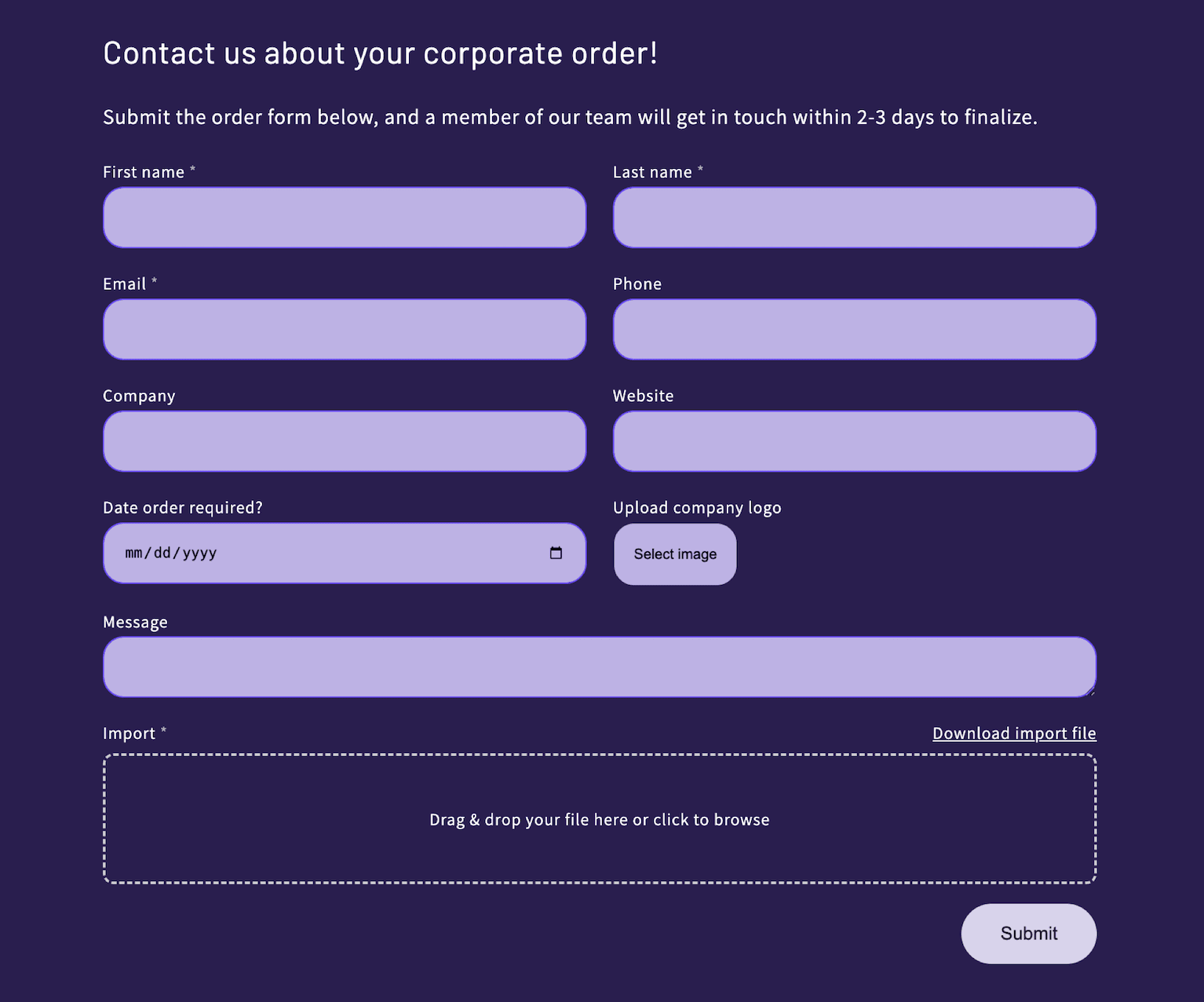
This form acts as your corporate gifting lead funnel. It removes friction, captures high-intent buyers early, and helps you respond faster with a tailored quote or ready-to-go Send. This is the way to grow revenue without adding complexity.
Moreover, this can be your competitive advantage. Allow your prospects to quickly share their specific requirements—recipient count, budget range, delivery timeline, and customization needs, without those lengthy phone calls or email exchanges.
With Send To Many Storefront Inquiry form, you can finally enjoy full end-to-end control over bulk orders, from inquiry to fulfillment. Learn how to configure and customize the form in our support docs.
The key to success is to make it obvious to customers that you want their business by making it easy for them to send an inquiry.
Visit our corporate gifting demo page to see exactly how a high-converting inquiry form can work on your Shopify store. Send To Many makes it possible to turn on a corporate gift page like this in minutes.
🎥️ Video tutorial: How to add a gifting inquiry form to your Shopify store.
Step 4: Curate, Don't Overwhelm Gift Products
One mistake we see often is merchants dumping their entire product catalog onto the gifting page. That overwhelms buyers.
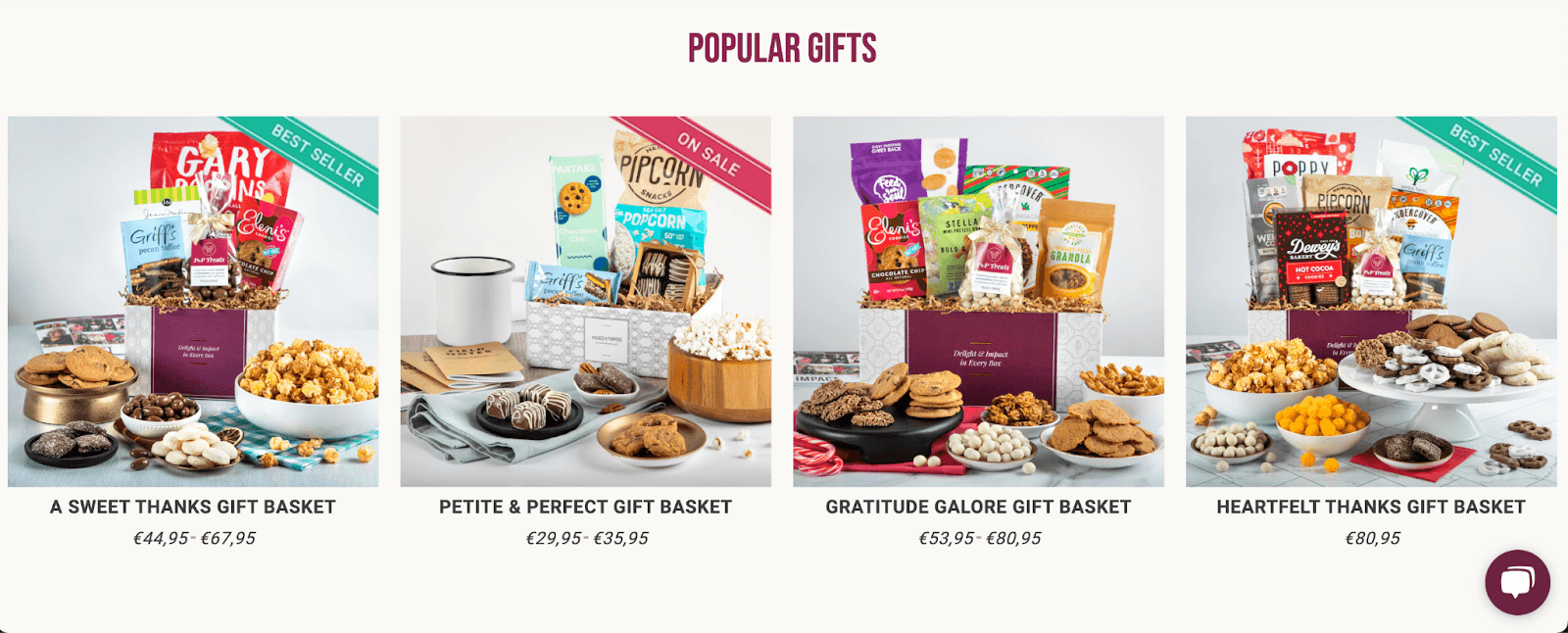
Instead, curate 5–10 top gift bundles or product picks that work especially well for corporate occasions. Organize them by category ("client thank-you gifts," "employee onboarding kits," "holiday gift boxes"), show beautiful photography, and clearly state what's inside each package.
List product details: what's included, sizes, price tiers
Call out discounts or bulk pricing
Mention the social or sustainability impact, if relevant
Example: Packed With Purpose does an excellent job breaking down what's in each gift, why it matters, and what social causes it supports. That level of detail builds trust with B2B buyers who want transparency and quality.
Step 5: Show Off Personalization and Branding Options
Corporate buyers care deeply about how the gift represents their brand. On your gifting page, highlight all the ways you help them personalize:
Branded packaging or sleeves
Custom logo placement
Personalized message cards for each recipient
Color or theme customization
Personalization transforms a nice gift into a meaningful connection between your corporate client and their recipients. Make it easy for companies to add their logo, custom messages, or branded cards with a simple form right on your gifting page.
Make sure you explain pricing and minimums clearly (e.g., "$5 per branded card, 10-unit minimum for custom logos"). Visual examples are key here — show a photo of a branded gift or a sample note card so buyers can imagine their company's presence in the gift.
Step 6: Address the Shipping and Fulfillment Challenge (With Send To Many)
Here's the big barrier that stops many merchants: how do you ship dozens or hundreds of gifts to different addresses?
Shopify's default checkout wasn't designed for this. Without the right tools, you're stuck manually entering orders, triple-checking spreadsheets, and juggling shipping labels.
This is exactly why we built Send To Many.
Automatically validate and correct address issues before shipping
Generate all the individual orders inside your Shopify store
Get a single, consolidated invoice for the client
Handle notifications and tracking from one centralized dashboard
With Send To Many, what used to take hours now takes minutes. Merchants who once avoided corporate orders because they feared the logistics now confidently take on 50, 500, or even 1,000-recipient orders.
Your corporate gifting page should explicitly tell buyers: "Yes! We ship directly to each recipient." That's what buyers expect, and it's what you can deliver with the right backend support.
Step 7: Make It Effortless to Get Started
The last thing a corporate buyer wants is a 20-field inquiry form or a complex onboarding process.
Offer a short, simple contact form: name, company, email, message
Include a direct phone number or email for urgent requests
Provide an easy way to upload a recipient spreadsheet, without forcing them to fill in dozens of columns or reformat their existing data.
One of Send To Many's strengths is its flexible, merchant-friendly upload process. We map your columns and data points intelligently, so you don't need to send clients a pre-rigid template or (worse) ask them to run clunky Excel macros.
On your page, emphasize that you make it painless for buyers to hand over their list and get started. That reassurance lowers friction and improves conversion rates.
Step 8: Showcase Social Proof and Use Cases
Nothing convinces corporate buyers faster than seeing how others have successfully used your gifting service. Add a section with short, specific testimonials from real businesses
Create simple case studies showing how different businesses involved corporate gifting in their routine and even have corporate gifting calendar scheduled with you (welcoming new employees, thanking loyal clients, or celebrating team milestones).

Share real examples of how companies used your corporate gifts to achieve business goals. Like the tech firm that sent branded welcome packages to 50 new remote employees and saw higher engagement, or the accounting company whose client appreciation gifts led to three referrals.
Step 9: Build Confidence With an FAQ Section
Anticipate and answer common objections right on the page.
Q: How soon can you deliver?
We recommend 2–3 weeks for most corporate orders, but we'll always confirm timelines upfront and help you meet urgent deadlines if needed.
Q: Can I send to multiple countries?
Yes! With Send To Many, we manage multi-destination shipping, including international orders. We'll provide clear costs and customs guidance.
Q: Do you offer discounts on large orders?
Yes — we offer tiered discounts starting at [X] units. Contact us for a custom quote.
Q: What if I need help choosing gifts?
Our gifting concierge can recommend options based on your budget, audience, and goals. We're here to make this easy.
By addressing concerns proactively, you build trust and reduce the chance that a buyer clicks away.
The tool for corporate gifting success
There's a hard moment in all of this. Shopify wasn't built for sending the same order to dozens of different addresses. Without the right setup, you're stuck manually entering orders, fixing address errors, and drowning in shipping notifications.
Send To Many is your game changer. What used to take hours now takes minutes, allowing you to take on corporate orders of any size with confidence. Get started for free, with plans to suit any merchant.


loved by





© 2026 Send To Many. All rights reserved.