

v3.34
Mar 30, 2026
Sends trigger Flows + Inventory Alerts
Send To Many now connects directly with Shopify Flow and gives you real-time inventory visibility across open Sends. And Send Types are now "Send Presets".
Sends now have Shopify Flow triggers
You can now automate workflows using three native Flow triggers: Send Created, Send Completed, and Aggregate Draft Order Completed. These show up in Flow’s trigger picker under Send To Many. Simply set up a Flow with one of these triggers and define the actions you'd like to take with the data from the Flow. Use them to notify your team when a new Send comes in, tag customers after all orders generate, or sync payment data to an external system the moment an invoice is paid, etc.
Send Created passes 7 fields:
Send ID: the Send To Many Send ID
Send name: the name the merchant gave the Send
Send preset name: which Send preset was used (e.g., "Corporate Gifting")
Send source:
manual,inquiry, orstorefrontCustomer ID: the Shopify customer's legacy numeric ID
Customer name: the customer's display name
Assigned user email: the team member assigned to the Send (if any)
Send Completed passes the same 7 above, plus:
Number of orders created: count of successfully generated recipient orders
Number of orders failed: count of orders that failed (e.g., inventory issues)
Number of import rows: total non-excluded rows in the Send
Aggregate Draft Order Completed passes 9 fields:
order_id: a Shopify order reference (the order created when the draft was completed) — this is the special
order_referencetype, so Flow can use it to access the full Shopify order objectSend ID, Send name, Send preset name, Send source, Customer ID, Customer name, Assigned user email: same as above
Aggregate draft order name: the Shopify draft order name (e.g.,
#D1234)
Note: you can also trigger Flows to act on the recipient ("child") orders created for your Sends. Simply use the standard "order created" trigger and filter it on the tags Send To Many adds to your orders (either our standard tags or the tags you set up on Send Presets or Checkout settings).
Inventory shortage alerts
During busy gifting periods, it can be hard to keep track of the inventory required to fulfill orders across your in-progress sends: Sends that are still being prepared or Sends where an invoice has already been sent, before orders actually generate. Now, Step 2 product cards warn you when available stock might not cover what you’re adding.
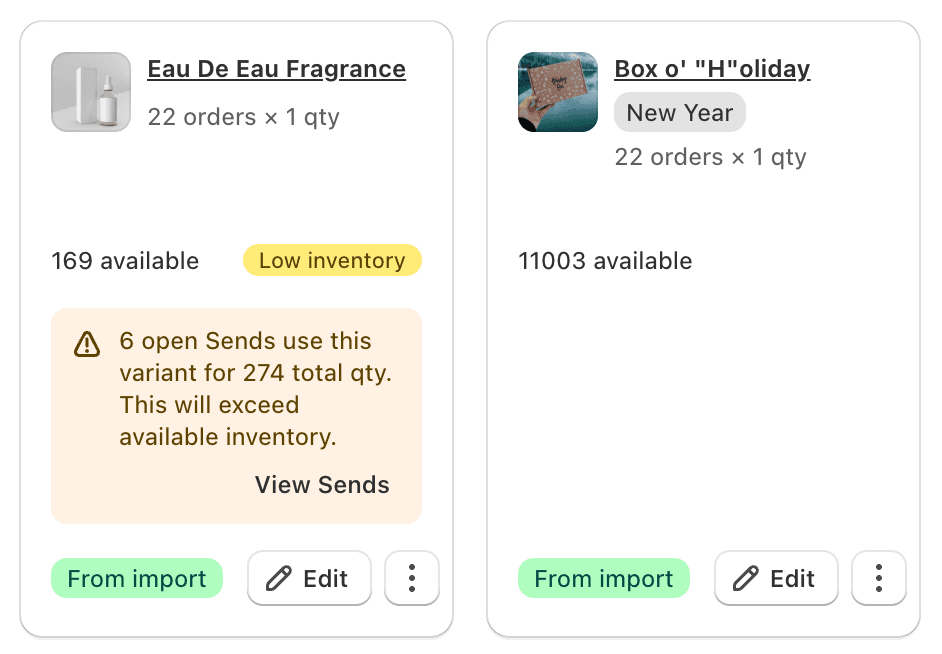
Click the alert to see exactly which open Sends are using that product and how many units each has committed. This feature is available on Pro plans and above.