

How Rosenblum Cellars Built a Gifting Journey Worth Copying
A stage-by-stage teardown of Rosenblum Cellars' gifting journey on Shopify, and what to check at each of the seven stages on your own store before the season peaks.

Written by
Cam Balzer
Founder
Writes practical guides on Shopify gifting workflows, bulk ordering, and customer experience.
Need this workflow?
Book a demo and see how Send To Many handles bulk gifting inside Shopify.
Book a demo
Wine is one of the easiest corporate gifts to choose and one of the hardest to buy in bulk. The buyer has a list of clients, a budget that needs sign-off, shipping rules that change by state, and a December deadline, and many winery sites give them a tasting room phone number. The order either becomes a week of emails with whoever answers that phone, or it goes to a competitor with a real gifting page.
Rosenblum Cellars, an Oakland winery, built the real gifting page. "Gifting" sits in the top navigation next to Shop and Wine Club, and a buyer planning to send a hundred bottles gets a catalogue, a quote form, and a multi-recipient checkout without leaving the site. That buyer is worth the effort: a corporate wine order is large on its own, and the person placing it may join the wine club and send again the following year. Here is the gifting journey Rosenblum built for that buyer, at each of the seven stages I use when I walk through a merchant's store.
Stage 1, Discover: Rosenblum knows the buyer has to sell this to someone else first
The Gifting page opens with Rosenblum's own promise: "Less stress. More celebrating. Whether you're sending five gifts or five hundred, we've made large-order gifting simple." Two buttons sit under it, Browse Holiday Catalog and Get a Quote.
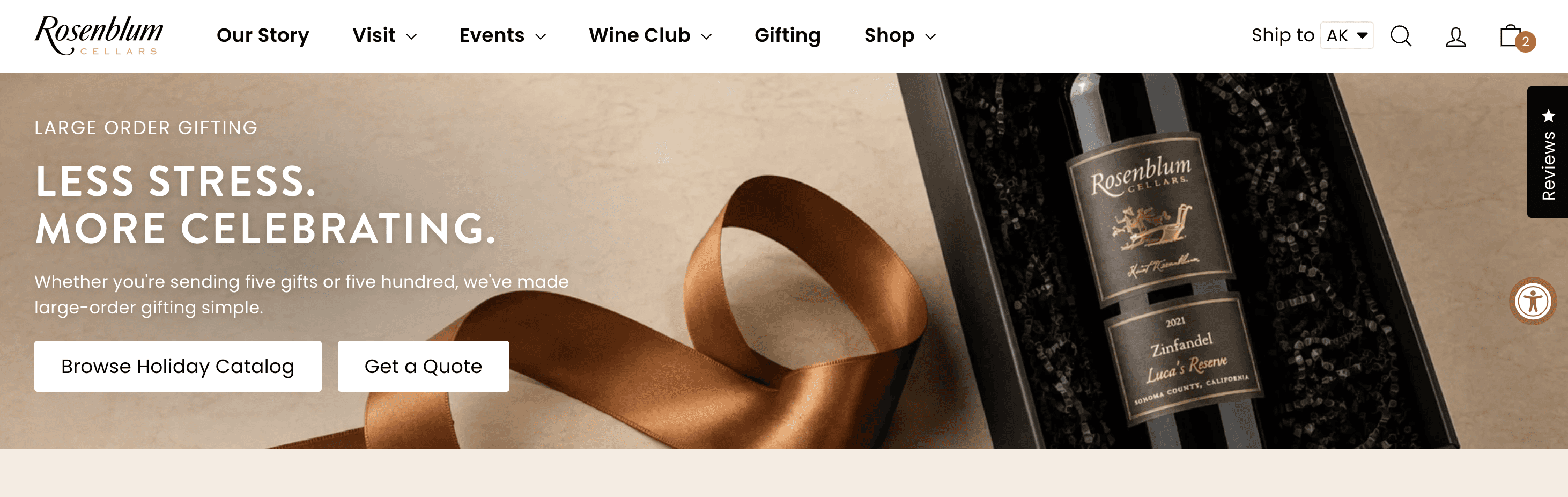
The catalogue is the part most stores skip. It covers the gift sets, pricing, and the operational questions a procurement buyer has to clear with their boss, and it carries a QR code straight to the bulk gifting portal. The corporate gifter is rarely the person who approves the spend, so Rosenblum gives them something to forward to whoever does. The catalogue does the selling in a meeting Rosenblum will never be in.

Stage 2, Choose: Two ways in, and the buyer can switch between them
The page lays out two options under one heading, "Two easy ways to gift": build the order yourself, or send a list and get a quote. A buyer who knows exactly what they want and a buyer who would rather hand it off both see a path meant for them.

The same choice shows up in the cart. Add a gift set and the cart drawer offers a Send to multiple recipients button next to Check out. A buyer who started as a single-address shopper can switch to multi-recipient without emptying the cart, and a buyer in the multi-recipient flow can drop back to a normal checkout. Nobody has to start over because they picked the wrong door.

Stage 3, Assemble: Curated sets and a spreadsheet template do the assembling
Rosenblum sells curated gift sets: the Oakland Favorites set, the Signature Whites set, the After Dinner Collection. Each one is a finished gift, so a corporate buyer picks a set and moves on to addresses instead of assembling bottles. A buyer with 80 names on a list is usually happy to be handed a good default.
For longer lists, the Get a Quote form offers a recipient template to download. The buyer fills in one row per person and uploads it with the inquiry. Past a dozen or so names, a spreadsheet is the way most buyers already have the list anyway.

The page also publishes holiday shipping deadlines by occasion and region, down to the order-by time. A buyer with a December 15 deadline needs that table before they need a product photo.

Stage 4, Pay: Order size becomes a reason to add one more recipient
Volume discounts scale with the list, and the buyer can see the next tier as they add recipients. Wine club member discounts also apply to gift purchases regardless of how many recipients are on the order, so a club member sending 60 gifts gets both. The buyer who was going to stop at 40 has a reason to find five more names.


For the buyer who stalls at the size of a self-serve total, the Get a Quote form is still there. That inquiry lands with Rosenblum's team instead of becoming an abandoned cart.
Stage 5, Confirm: The gifter needs to see that all 40 went through
After a multi-recipient order, the gifter's first question is whether every recipient made it in. With Send To Many, that is answered by a thank-you page linking to the recipient-by-recipient view, a confirmation email that explains the order structure, and an account page showing every recipient order with its tracking number. Those three things replace the "where is order 14 of 40" emails.
Rosenblum's FAQ covers the questions that come before that point: can I ship to multiple addresses, can each recipient get a different gift, can I add a personal message.

Stage 6, Arrive: The recipient is a future customer who hasn't tasted the wine yet
For a winery, the box landing on a desk is the first contact with someone who may join the club or send their own gifts next year. The default Shopify shipping notification shows them prices for something they didn't buy. A short branded note ("something from Sarah is on its way") with the sender's name, the arrival date, and a tracking link does the job better, and leaves prices out.
Keep it silent only if the gift is meant to be a surprise.
Stage 7, Repeat: Wine club makes next year's order easier than this year's
The corporate buyer who sent 60 gifts in December is likely to send again next December. Rosenblum gives that buyer two reasons to stay close in the meantime: wine club membership, which carries discounts into every future gift order, and gift cards for the last-minute occasion that can't wait for shipping.
The recipients matter here too. Someone who liked the Oakland Favorites set knows where to go when it's their turn to give, or when they want a case for themselves.
Where to start
Open your own store and walk the same seven stages as a corporate buyer with a list and a deadline. The most common gaps I see are Stage 1 (gifting isn't in the nav, so the buyer never learns you can handle their list) and Stage 3 (there's no spreadsheet upload, so anything over ten recipients becomes an email to CS).
Send To Many helps you deliver an amazing gifting journey to your gifting customers, whether they're sending to 2 or 2,000 recipients. With multi-recipient checkout, spreadsheet upload, and the confirmation pages handled inside Shopify, you can focus on the stages that are yours to design: the catalogue, the gift sets, the deadlines table, and the note that arrives with the box.
If you'd like to check your own store first, our stage-by-stage gifting journey guide for Shopify has setup links for every stage. Or book a call with me and we'll walk your gifting journey one stage at a time, then pick the single change that moves the most revenue before your season peaks. Bring your store. I will bring the stopwatch.


Product
SOLUTIONS
loved by





© 2026 Send To Many. All rights reserved.